How to optimize prestashop for large product inventories

Managing a large inventory of products on your PrestaShop store can be a challenging task, but with the right tools and strategies, you can optimize your store for efficiency and success.

[find out more at www.boostmyshop.com]

Luckily, with the help of a powerful SaaS service like PSQQQ, store owners, managers, developers, integrators, and agencies can streamline their product data management process and achieve better results.

One of the key features of PSQQQ is its ability to import and update product data seamlessly.

With just a few clicks, users can easily add new products, update existing ones, and ensure that their inventory is always up-to-date.

This saves valuable time and effort, allowing store owners to focus on other important aspects of their business.

Additionally, PSQQQ’s repricing functionality is essential for optimizing product prices to stay competitive in the market.

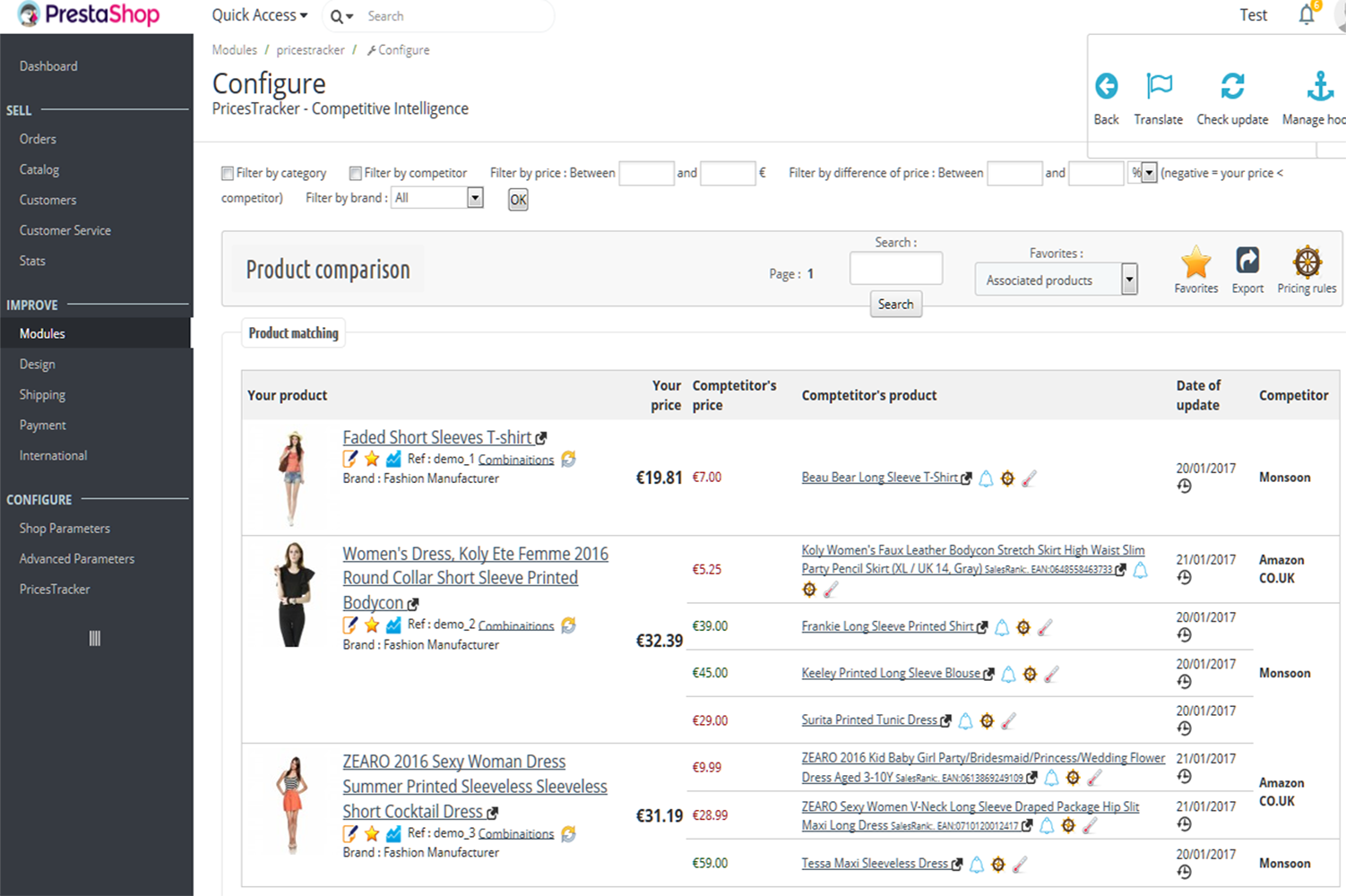
By automatically adjusting prices based on market trends and competitor analysis, users can maximize their profits and attract more customers.

[learn more at loadforge.com]

Integrating suppliers’ APIs is another crucial feature offered by PSQQQ.

This allows users to connect directly with their suppliers, ensuring a smooth and efficient supply chain management process.

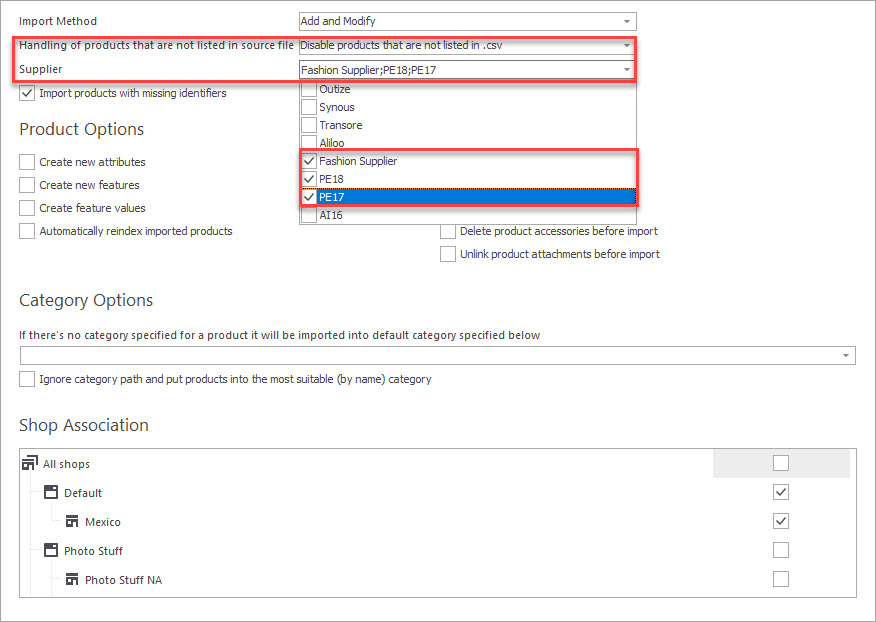
With the ability to import data from various file formats such as CSV, XML, and Excel, users can easily manage large volumes of product information without any hassle.

Furthermore, the search functionality of PSQQQ enables users to quickly find the content and images they need for their PrestaShop store.

This not only saves time but also enhances the overall user experience, making it easier for customers to find and purchase the products they are looking for.

In conclusion, by leveraging the powerful features of PSQQQ, PrestaShop store owners can optimize their product inventories for better performance and profitability.

With its user-friendly interface and advanced functionality, PSQQQ is the ultimate solution for managing large product inventories efficiently.

Visit psqqq.com today to discover how PSQQQ can take your PrestaShop store to the next level.


How to set up price rules in prestashop for different customer groups

When it comes to running a successful e-commerce store on the PrestaShop CMS platform, one of the key factors that can drive sales and boost profitability is setting up price rules for different customer groups.

By offering personalized pricing based on customer segments, you can effectively target and attract specific types of buyers, ultimately increasing conversions and customer loyalty.

With the help of our innovative SaaS service at psqqq.com, setting up price rules in PrestaShop for different customer groups has never been easier.

Our platform empowers store owners, managers, developers, integrators, and agencies to efficiently manage and customize pricing strategies to cater to the diverse needs of their clientele.

To begin setting up price rules in PrestaShop through our service, follow these simple steps:

1.

Access the Price Rules Section : Log in to your PrestaShop backend and navigate to the Price Rules section where you can create and manage your pricing strategies.

2.

Define Customer Groups : Identify the different customer groups you want to target with unique pricing.

This could include wholesale buyers, VIP customers, or first-time shoppers.

3.

Set Pricing Parameters : Determine the specific pricing parameters for each customer group, such as percentage discounts, fixed discounts, or special offers.

4.

Apply Rules : Assign the price rules to the respective customer groups to ensure that they see the customized pricing when browsing your store.

5.

Monitor and Optimize : Regularly review the performance of your price rules and make adjustments as needed to maximize their effectiveness in driving sales.

[learn more at ewonta.com]

By implementing tailored price rules for different customer groups in your PrestaShop store, you can create a more personalized shopping experience that resonates with your target audience.

Whether you are looking to incentivize repeat purchases, attract new customers, or reward loyal clients, our SaaS service provides the tools you need to streamline this process efficiently.

At psqqq.com, we are dedicated to helping PrestaShop store owners unlock the full potential of their e-commerce businesses through advanced features like product data import, automated repricing, supplier API integration, and content/image searching capabilities.

With our platform, you can take your online store to new heights and stay ahead of the competition in today’s dynamic e-commerce landscape.

[check details at docs.prestashop-project.org]

Elevate your PrestaShop store’s pricing strategy with our user-friendly SaaS service at psqqq.com, and start seeing tangible results in customer engagement and sales growth.

Stay ahead of the curve and drive revenue by harnessing the power of personalized pricing for different customer groups.

[read more at ewonta.com]


Prestashop electronics store, technical product specifications

PrestaShop Electronics Store: Technical Product Specifications

For PrestaShop CMS store owners, ensuring accurate and up-to-date product information is crucial to maintaining a competitive edge in the crowded online marketplace.

With the ever-growing demand for electronics products, it becomes imperative to have a reliable solution in place for managing technical product specifications efficiently.

[learn more at www.fmemodules.com]

This is where our SaaS service at psqqq.com steps in to simplify the process and empower users to take control of their product data management effortlessly.

One of the key functionalities offered by our service is the ability to import and update products data seamlessly.

This feature enables PrestaShop store owners, managers, developers, integrators, and agencies to keep their product catalogs current with the latest specifications, ensuring that customers always have access to accurate information when making purchasing decisions.

Moreover, our service allows users to reprice items dynamically, giving them the flexibility to adjust prices based on market trends, competition, or any other factors influencing pricing strategies.

This ability to react swiftly to market changes can help users stay ahead of the curve and maximize their sales potential.

In addition, our service simplifies the process of integrating suppliers’ APIs, making it easier for users to access and sync product data directly from their suppliers.

By automating this process, users can save time and effort while ensuring that their product listings are always up-to-date.

Furthermore, the capability to import data from various file formats such as CSV, XML, and Excel further enhances the user experience by providing flexibility and compatibility with different data sources.

This feature streamlines the process of adding new products or updating existing ones, saving users valuable time and resources.

[check details at github.com]

Another notable functionality of our service is the ability to search and import content and images directly into PrestaShop, making it easier for users to enrich their product listings with engaging visuals and detailed descriptions.

[get more info at www.prestashop.com]

This not only enhances the overall shopping experience for customers but also improves search engine visibility, leading to increased traffic and sales.

In conclusion, our SaaS service at psqqq.com is a comprehensive solution designed to empower PrestaShop electronics store owners with the tools they need to manage technical product specifications effectively.

By leveraging the capabilities of our service, users can streamline their product data management processes, improve their online visibility, and ultimately drive more sales.

Experience the power of simplified product management with our innovative solution today.


Prestashop bulk product editor, mass update techniques

Are you a PrestaShop store owner, manager, developer, integrator, or agency looking for an efficient solution to streamline your product management tasks?

Look no further than PSQQQ’s PrestaShop Bulk Product Editor.

Our SaaS service is designed to simplify and automate the process of importing, updating, and repricing products in your PrestaShop store.

[learn more at www.prestashop.com]

With PrestaShop Bulk Product Editor, you can easily import and update product data in bulk, saving you valuable time and resources.

Whether you need to integrate suppliers’ APIs, import CSV, XML, or Excel files, or search for content and images to enhance your product listings, our tool provides a user-friendly interface that streamlines these tasks with ease.

One of the key features of our service is the ability to mass update product information efficiently.

With just a few clicks, you can update prices, descriptions, images, and other attributes for multiple products simultaneously.

[read more at help-center.prestashop.com]

Say goodbye to manual data entry and tedious one-by-one updates – PrestaShop Bulk Product Editor empowers you to make changes in bulk, saving you time and effort.

By leveraging advanced techniques and automation tools, our SaaS service ensures that your PrestaShop store remains up-to-date with the latest product information and pricing.

Whether you are a small business owner managing a single store or a larger agency handling multiple PrestaShop websites, our solution is scalable to meet your needs.

Don’t let manual product management tasks slow you down.

With PrestaShop Bulk Product Editor from PSQQQ, you can take control of your product catalog and drive efficiency in your online store operations.

Try our service today and experience the difference it can make in simplifying your product management workflows.

Streamline your product updates and management with PrestaShop Bulk Product Editor from PSQQQ.

[find out more at www.zlabsolutions.com]

Sign up now and revolutionize the way you manage your PrestaShop store!


How to scale your prestashop store with automation

Running a successful PrestaShop store can be a rewarding venture, but as your business grows, managing and updating product data can become increasingly time-consuming.

This is where automation can be a game-changer for store owners, managers, developers, integrators, and agencies looking to scale their operations efficiently.

[find out more at prestashop.com]

With the right tools and strategies in place, you can streamline your processes, save time, and focus on growing your business.

[learn more at help-center.prestashop.com]

At PSQQQ, our SaaS service is designed to help PrestaShop users automate essential tasks such as importing and updating product data, repricing items, integrating suppliers’ APIs, and importing files in various formats like CSV, XML, and Excel.

[get more info at help-center.prestashop.com]

With our intuitive platform, you can easily search for content and images to enhance your store’s offerings and improve the overall shopping experience for your customers.

[read more at prestashop.com]

One of the key benefits of automating your PrestaShop store is the ability to save time and reduce manual errors.

By setting up automated processes for importing product data and syncing inventory levels, you can ensure that your store is always up to date with the latest information without having to spend hours manually updating each item.

This not only improves efficiency but also helps you stay competitive in the ever-evolving e-commerce landscape.

Additionally, automation allows you to focus on strategic tasks that require human input, such as crafting compelling marketing campaigns, analyzing data to identify trends, and improving customer service.

By offloading repetitive tasks to our SaaS service, you can free up valuable time to work on activities that drive growth and profitability for your business.

Moreover, automation can help you scale your PrestaShop store more effectively by enabling you to handle a larger volume of products and orders without significantly increasing your workload.

Whether you’re a small boutique store or a large e-commerce agency, the ability to automate essential processes can help you expand your offerings, reach a wider audience, and boost your bottom line.

In conclusion, leveraging automation is essential for modern PrestaShop store owners and professionals looking to scale their operations efficiently.

With PSQQQ’s SaaS service, you can streamline your processes, save time, and focus on growing your business without getting bogged down by manual tasks.

Discover the power of automation and take your PrestaShop store to new heights today.

======
Total words: 383


How to integrate external systems with prestashop

Integrating external systems with PrestaShop can greatly enhance the functionality and efficiency of your online store.

As a store owner, manager, developer, integrator, or agency working with PrestaShop, it’s crucial to have the right tools and resources to seamlessly connect your store with other platforms and services.

With the help of a reliable SaaS service like psqqq.com, you can easily achieve this integration and take your store to the next level.

One of the key features offered by psqqq.com is the ability to import and update product data from external systems into your PrestaShop store.

This is particularly useful for store owners who work with multiple suppliers or have a large inventory to manage.

By automating the process of importing and updating product information, you can save time and ensure that your store always displays accurate and up-to-date product listings.

Additionally, psqqq.com allows users to reprice items based on various factors such as supplier prices, market demand, and competition.

With dynamic pricing capabilities, you can optimize your pricing strategy to maximize sales and profitability.

By integrating with external systems and APIs, you can access real-time pricing data and adjust your prices accordingly to stay competitive in the market.

[get more info at www.macronimous.com]

Another valuable feature offered by psqqq.com is the ability to integrate with suppliers’ APIs for seamless inventory management.

By connecting your PrestaShop store with your suppliers’ systems, you can easily sync inventory levels, automate order processing, and streamline the fulfillment process.

This ensures that you never run out of stock and can fulfill customer orders in a timely manner.

Furthermore, psqqq.com enables users to import data in various formats such as CSV, XML, and Excel, making it easy to transfer information between different systems.

Whether you need to import product data, customer information, or sales reports, this SaaS service simplifies the process and eliminates the need for manual data entry.

[learn more at www.gregorychartier.fr]

In conclusion, integrating external systems with PrestaShop is essential for growing your online store and staying ahead of the competition.

With the advanced features and capabilities offered by psqqq.com, you can easily connect your store with external platforms, automate key processes, and optimize your overall operations.

Take advantage of this powerful SaaS service to unlock the full potential of your PrestaShop store and drive success in the competitive ecommerce landscape.


How to batch process product images for prestashop

Batch processing product images is a crucial task for PrestaShop store owners looking to streamline their online operations and enhance the visual appeal of their products.

With the right tools and techniques, this process can be simplified and automated, saving time and effort while improving the overall user experience.

With the use of a specialized SaaS service like psqqq.com, store owners, managers, developers, integrators, and agencies can easily import and update product images in bulk, eliminating the need for manual uploading one by one.

This not only speeds up the process significantly but also ensures consistency in image sizes and quality across all products.

One of the key advantages of batch processing product images for PrestaShop is the ability to reprice items based on visual appeal.

By integrating supplier APIs and importing data from various file formats such as CSV, XML, and Excel, users can quickly adjust prices based on the quality and relevance of product images, ultimately boosting sales and customer satisfaction.

Additionally, the search functionality provided by psqqq.com allows users to easily find and select relevant content and images for their PrestaShop store, further enhancing the overall shopping experience for customers.

[get more info at www.prestashopmanager.com]

This can significantly increase conversion rates and drive more traffic to the online store.

In conclusion, utilizing a SaaS service like psqqq.com to batch process product images for PrestaShop is a smart and efficient way to manage and enhance the visual aspect of an online store.

By automating this process, store owners can focus on other important aspects of their business while ensuring that their products are presented in the best possible light to attract and retain customers.

[get more info at www.prestashop.com]


How to reduce manual work in prestashop store management

When running a PrestaShop store, managing products, prices, and supplier information can be a time-consuming and tedious task.

Manual updates and imports can eat up valuable hours that could be better spent on growing your business.

Fortunately, there is a solution to streamline these processes and reduce manual work in PrestaShop store management.

With the help of advanced SaaS services like psqqq.com, PrestaShop store owners, managers, developers, integrators, and agencies can optimize their workflows and simplify their everyday tasks.

This innovative platform offers a wide range of features designed to make managing a PrestaShop store more efficient and effective.

One of the key functionalities that psqqq.com provides is the ability to import and update product data seamlessly.

Instead of manually entering each product detail, users can easily upload product information in bulk, saving time and effort.

This feature not only speeds up the process but also ensures accuracy and consistency across the product catalog.

Moreover, psqqq.com allows users to reprice items effortlessly.

With just a few clicks, store owners can adjust pricing strategies, apply discounts, and update prices based on market trends.

This dynamic pricing capability helps businesses stay competitive and maximize their profitability without the need for manual interventions.

[check details at web.flobri.com]

Integrating suppliers’ APIs is another essential function offered by psqqq.com.

By automating the supplier integration process, users can sync inventory levels, track shipment statuses, and manage orders more effectively.

This seamless integration helps avoid stockouts, reduce delays, and improve overall supply chain management.

In addition, psqqq.com supports importing data from various file formats such as CSV, XML, and Excel.

[get more info at www.prestashopmanager.com]

This feature enables users to migrate product information from external sources effortlessly and maintain data consistency within their PrestaShop store.

Whether it’s updating price lists, adding new products, or synchronizing inventory levels, importing data is now a quick and painless task.

Furthermore, the platform offers advanced search capabilities to help users find content and images for their PrestaShop store easily.

With powerful search algorithms and filters, users can locate specific products, descriptions, or visuals within seconds, saving time and simplifying content management.

By leveraging the functionalities provided by psqqq.com, PrestaShop store owners can significantly reduce manual work, streamline store management processes, and focus on strategic initiatives to drive business growth.

Embracing automation and efficiency is the key to staying competitive in the fast-paced world of e-commerce, and psqqq.com is your partner in achieving success.


How to create custom prestashop modules for product management

When it comes to managing your PrestaShop store efficiently, having custom modules can make a significant difference.

These modules can be tailored to suit your specific needs, making it easier to import and update product data, reprice items, integrate supplier APIs, and more.

If you’re looking to streamline your product management process, creating custom PrestaShop modules is the way to go.

[learn more at prestahero.com]

To start creating custom PrestaShop modules for product management, you need to have a clear understanding of your requirements.

[check details at www.gilsys.com]

Identify the specific functionalities you need for your store and outline the scope of the modules you want to develop.

Whether it’s importing products from different sources, updating prices automatically, or integrating supplier APIs for seamless inventory management, having a clear plan is essential.

Next, familiarize yourself with PrestaShop’s module development guidelines.

PrestaShop provides extensive documentation and resources to help developers create custom modules efficiently.

By following these guidelines, you can ensure that your modules are compliant with PrestaShop’s standards and work seamlessly with your store.

When developing custom modules for product management, it’s crucial to pay attention to performance and user experience.

Optimize your modules to ensure they are lightweight, fast, and user-friendly.

[read more at www.hiddentechies.com]

This will not only improve the overall performance of your store but also enhance the user experience for both store owners and customers.

Once your custom PrestaShop modules are ready, it’s time to integrate them into your store.

PrestaShop makes it easy to install and activate modules, allowing you to start using them right away.

Test your modules thoroughly to ensure that they work as intended and address your product management needs effectively.

By creating custom PrestaShop modules for product management, you can take your store’s efficiency and productivity to the next level.

[learn more at www.prestashop.com]

With the right modules in place, you can automate tasks, streamline processes, and enhance the overall performance of your PrestaShop store.

Give your store the competitive edge it needs with custom PrestaShop modules tailored to your specific requirements.


Prestashop beauty products, managing product lines and shades

PrestaShop Beauty Products: Managing Product Lines and Shades

Are you a store owner, manager, developer, integrator, or agency working with PrestaShop CMS?

If so, you understand the importance of efficiently managing your beauty product lines and shades.

With the increasing demand for beauty products, it’s crucial to stay ahead of the competition by offering a diverse range of products to your customers.

[check details at sitebloom.cc]

At psqqq.com, we offer a comprehensive SaaS solution that allows you to seamlessly import and update product data for your PrestaShop store.

[read more at help-center.prestashop.com]

With our user-friendly interface, you can easily reprice items, integrate suppliers’ APIs, and import CSV, XML, or Excel files with just a few clicks.

Our platform also enables you to search for content and images specifically tailored for your PrestaShop store, saving you time and effort in sourcing quality product information.

[check details at www.prestashop.com]

By utilizing our SaaS service, you can streamline your product management process, ensuring that your customers have access to the latest beauty products and shades.

With the ability to import and update product lines efficiently, you can stay on top of trends and offer a diverse selection of products to meet the varying needs of your customer base.

Don’t let outdated product data or limited shade options hold your store back.

Embrace the power of psqqq.com to take your PrestaShop beauty products to the next level.

[read more at buildify.cc]

Join us today and elevate your product management game with ease and efficiency.

[find out more at doc.prestashop.com]